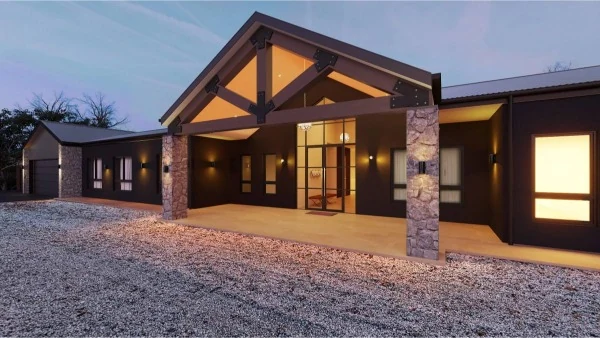
What 3D rendering means in plain words: how a render is made from your plans, the main types, and how Australian builders and home owners use renders.
Quick answer: 3D rendering is the process of turning a 3D model of a building, made from its plans, into photorealistic images or videos before anything is built. Builders, architects, developers and home owners use renders to market projects, get client sign-off, support council submissions and choose colours and finishes.

What 3D Rendering Means, in Plain Words
In property work, 3D rendering turns a digital model of a building into a finished picture that looks like a photograph. Because the model is built from the plans, the picture shows the home, interior or development as it's designed, so everyone can explore the project before construction begins. Each finished picture is called a render.
Three terms often get mixed up:
- 3D modelling: building the digital model to scale, with the walls, roof, windows and every other part of the design.
- 3D rendering: turning that model into a finished image or video, with materials, colour, light and shadow.
- 3D visualisation: the wider term for showing a design in 3D, including renders, videos, floor plans and 360 images.
What makes a render look real is light. Ray tracing and path tracing simulate how light bounces between surfaces, picking up colour, reflections and soft shadows. That is the biggest difference between an image that looks computer-made and one that looks like a photo. Our article on Gen7 rendering technology explains this in more detail.
3D rendering is also used for products, advertising, films and video games. This guide sticks to buildings, but we also do 3D product rendering for manufacturers.
How a 3D Render Is Made From Your Plans
- 1. Send your plans. Floor plans and elevations as PDF, DWG, RVT or SKP files, or even hand sketches, with your colour and finishes choices. We regularly work from preliminary sketches and concept plans too. Landscape plans help. For interiors, send mood boards and any material or colour references, and for a photomontage we also need the site address and any site photos.
- 2. We build the 3D model. We build one 3D model from your plans, and the same model is used for renders, floor plans and videos, so adding a video later doesn't mean starting again.
- 3. You choose the camera angle. We set up several clay camera angles (plain views of the model without colours) for you to choose from. One quick approval and production starts.
- 4. Materials, colours, lighting and landscaping go on. Your facade materials, roof, finishes and landscaping are added, and you can pick the time of day: golden hour, dusk or midday. Send product links or swatches and we'll match them.
- 5. Review and delivery. You see drafts along the way, then receive high-resolution (print-ready, 300 DPI) and low-resolution (web-optimised) files with a colour specification. Every job has an internal quality audit before delivery.

You don't need to learn 3D software or understand rendering pipelines to get a render. You just need your plans.
You can learn to render yourself, but a photo-like result needs an accurate model, realistic materials, careful lighting and a powerful computer, and those skills take time to build. For a builder, architect or home owner with a project to sell or get approved, sending the plans to a studio is usually quicker.
The Main Types of 3D Renders
Most projects use one or more of these, and all of them are part of our 3D rendering services:
- Exterior renders: front elevations with your facade materials, roof, landscaping and lighting, and the same home in day or dusk light or in alternative colour schemes.
- Interior renders: kitchens, bathrooms, living and dining areas, bedrooms, wardrobes, office fit-outs, retail spaces and hospitality venues.
- Aerial and streetscape renders: bird's-eye views of the whole site layout, landscaping and access, or the development seen from the footpath with neighbouring homes, trees and cars for scale.
- Photomontages: a render of your proposed building placed into a real photo of the site, taken from a set point such as the street, a neighbour's yard or a public viewpoint.
- Walkthrough videos and 360 tours: a walkthrough moves a camera through or around the home like a short film, and most architectural videos run 60 to 90 seconds. A 360 tour lets viewers spin around each room themselves. Not sure which you need? Read 3D renders or a walkthrough video.
- 3D floor plans: the layout shown as a photorealistic bird's-eye view, with walls, furniture and finishes in place. Our guide to 2D vs 3D floor plans compares the two.
Real-Time vs Pre-Rendered Images
You'll see these two terms in most guides to 3D rendering. Real-time rendering draws each image instantly as you move, the way a video game does, so you can wander through a model freely. It has traditionally relied on a fast shortcut called rasterisation, which works out what each part of the screen shows without fully tracing the light. Modern graphics cards now make real-time ray tracing possible too. Pre-rendered (or offline) images are calculated in advance, which gives the computer time to work out light, shadow and reflections in full detail.
For a property project, the practical question is what you want to put in front of buyers, clients or council. Still renders and walkthrough videos arrive as finished files, ready for a listing, a brochure or a submission. If you'd rather let people look around for themselves, a 360 image or virtual tour gives them that freedom.
What 3D Rendering Is Used For
- Selling before it's built. Renders and walkthrough videos help buyers picture a home that doesn't exist yet. See our guide to 3D renders for off-the-plan sales.
- Client sign-off. Builders and architects show clients the finished home before work starts, which improves communication and reduces the risk of costly design changes. Read how builders use renders to win clients.
- Council and development applications. Councils often ask for photomontages with a development application (DA), and streetscape views help councils and neighbours understand the scale and design of a proposal. Requirements differ, so check your own council's DA lodgement guidelines, and see our council submission tips.
- Display homes and listings. Exterior and interior renders, marketing floor plans and fly-around videos for display homes, realestate.com.au and Domain listings, and brochures.
- Choosing colours and facades. Colour consultation is part of our render service, and we can prepare alternative colour schemes so you can compare them side by side. Our guide to house facade styles shows how to compare styles in 3D.
- Renovations. See your renovation in 3D, inside and out, before you spend the money.
How Accurate Is a 3D Render?
A render is only as accurate as the information behind it. Because a plan-based render starts from a scale 3D model of your drawings, it shows the design as drawn. The more detail you send, the more accurate your render: a finishes schedule, colour selections and product links or swatches all help. For a council submission, make sure the renders are produced from, and match, your final drawings.
That is the key difference from an AI-generated picture or a quick concept sketch. Those can look appealing, but they aren't built from your plans. Nothing ties them to the real dimensions, rooflines or materials, so they shouldn't be relied on for client sign-off or council documents.
A render shows how the finished design will look. It isn't a construction drawing, so your builder still works from the approved plans.
Our studio is led by Anthony Milostic, a former James Hardie technical manager who wrote many of its installation manuals. He has more than 25 years in the building industry. You can read more about our team.
Frequently Asked Questions
What is the difference between 3D modelling and 3D rendering?
3D modelling builds the digital model of the building from its plans. 3D rendering turns that model into a finished photorealistic image or video, with materials, colour and light.
What software is used for 3D rendering?
Studios use professional 3D modelling and rendering software on powerful computers, and Gen7 is the name of our own rendering pipeline. You don't need any of it yourself: we work from Revit, ArchiCAD, SketchUp and all major BIM/CAD formats, as well as PDFs and hand sketches.
Do I need finished plans for a 3D render?
No. We regularly work from preliminary sketches, concept plans and even hand drawings. The more detail you send, the more accurate your render, and for a council submission the renders should match your final drawings.
Can I change the colours after the render is done?
Yes. We can prepare alternative colour schemes, usually within 24 to 48 hours, so you can compare them side by side before you choose.
Can 3D renders be used for a council DA?
Yes. Our exterior renders and photomontages are used in development application (DA) submissions as well as for sales and marketing. Requirements differ between councils, so tell us which council and what they've asked for, and we'll set up the views to match.
Is a 3D render the same as an AI-generated image?
No. A 3D render is made from a scale 3D model built from your plans, so it shows the design as drawn. An AI-generated image isn't built from your drawings, so it can't be relied on to match what will be built. AI does help inside our process (Gen7 uses AI-assisted 3D modelling), but the final image still comes from the model of your plans.
Ready to see your project before it's built? Send your plans and we'll quote within the hour during business hours. Most renders take 3–5 business days, with next-day service available on request, and new 3D renders start from $250 +GST. Our 3D render cost guide sets out our prices. Start with our 3D rendering services, or go straight to Exterior 3D Renders, Interior 3D Renders or 3D Photomontages.
Sources and further reading
- Physically Based Rendering: From Theory to Implementation, the free textbook on how ray tracing simulates light.
- NATSPEC: BIM guidance, for how 3D models are used across a project.
Ready to get started?
Get a Quote in 60 Minutes
Talk to our team about your project. We respond within 60 minutes during business hours.
Get a Free Quote